


Support for .NET Framework 4 Client Profile in NLog 2.0
04 Mar 2010.NET Framework 4 client profile is a subset of .NET framework used for client programming. It’s a smaller download, because it does not have some server-specific assemblies such as System.Web.dll, compilers and design-time components. When your project targets the client profile, VS and the compiler will validate that it can actually run in that environment. Your application cannot (statically) reference any system DLLs which are not available in the client profile or any other dlls which may depend on such system assemblies.
Why am I writing about this and how is it related to NLog?
Historically NLog has been distributed as a single assembly with static references to all the required system assemblies, including ones which will no longer be available in the client profile:
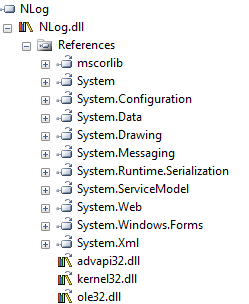
As you can see, we have System.Web.dll (because of ASP.NET-specific layout renderers and modules) and System.Messaging.dll (because of MSMQ target) which are from extended profile. If I were to distribute NLog 2.0 with those dependencies, people would not be able to compile their client applications using it- this is bad.
Difficult choice
Since people use NLog for both client-side and server-side deployments (and removing ASP.NET support is not an option) I need to have builds of NLog which support both environments. There are 3 options I’m considering:
- Release two versions of NLog.dll – one for .NET 4.0 Extended profile and one for .NET 4.0 Client profile
- Remove static dependencies and release single NLog.dll which detects the profile at runtime and invokes System.Web/System.Messaging through reflection.
- Release NLog.dll which would be client-only subset and NLog.Extended.dll which would include features specific to extended profile. This would mean that NLog 2.0 for other versions of the framework would also be split into NLog.dll and NLog.Extended.dll
Each option has different pros and cons, which makes this a hard choice:
Option 1 has the following advantages:
- Single assembly to deploy in all scenarios (now that NLog.ComInterop.dll has been merged with NLog.dll there is truly a singly dll)
- Relatively simple code – stuff which does not compile on client profile will be simply #ifdef-ed.
- No dynamic invocation
But there is possible confusion because of existence of two different builds of the same component (with the same name, version numbers and everything else) with slightly different feature set.
Option 2 means single assembly, but potentially slower and harder-to-maintain reflection code
Option 3 is probably the cleanest (there is no conditional compilation and no dynamic invocation), but it means that there will be sometimes 2 assemblies to deal with – in client apps you would reference NLog.dll and in extended profile apps, you can (optionally) use NLog.Extended.dll.
What do you think? Which of those options should I choose? Would you prefer a single assembly over multiple ones? Do you think reflection is a good practice to avoid having to deal with client profile limitations?
Please post your thought in comments.